Mail Scanner — spam filtering with a quarantine your customers manage
$0.99 / mo · per server
The successor to MailScanner Front-End for cPanel servers. Every incoming message is scored by SpamAssassin, then delivered to the inbox, the Junk folder or a quarantine — and each customer reviews, releases and tunes their own quarantine right in their cPanel.
When ConfigServer discontinued MailScanner Front-End (MSFE), hosting providers lost the tool that sorted their customers' spam and gave them a quarantine — and we were one of them. Mail Scanner is what we built to replace it on our own servers. It goes one step further: your customers manage their quarantine themselves, in their cPanel, instead of opening a ticket.
Finds MSFE / MailScanner on the server and takes it out cleanly — its files are moved aside, never deleted
Its service, cPanel page, hooks, scheduled tasks and mail-server settings are removed and checked one by one
Built on cPanel's own Exim and SpamAssassin — no second mail stack to keep alive
Mail keeps flowing whatever happens: if the scanner stops answering, Exim delivers without it
Previous filter: MailScanner Front-End
Configuration › Server state
✓Incoming mail no longer goes through the previous filter.
✓The previous filter's service is stopped and removed.
✓Its page is gone from WHM and from cPanel.
✓cPanel no longer runs its hooks.
✓Its files are moved aside, not deleted.
Nothing of the previous spam filter is left on this server.
Mail Scanner · previous filter removed (illustration)
Every message scored, sorted three ways
Mail Scanner puts its own scanning service between Exim and cPanel's SpamAssassin. Every message the server accepts gets spam points, and the points decide where it goes — nothing high-scoring is bounced or lost.
Server defaults: Junk folder from 5 points, quarantine from 10 — each account can set its own
The Junk folder is cPanel's Spam Box, turned on for every account at install
Quarantined mail is kept 1 to 365 days (30 by default), then purged nightly
Spam sent to a forwarder lands in the quarantine of its target mailboxes on this server
Incoming message → SpamAssassin score
< 5InboxDelivered as usual
5 – 9.9Junk foldercPanel's Spam Box, in the account
10 +QuarantineHeld 30 days · the customer releases or deletes
Server defaults · each account can set its own levels
Mail Scanner · where a message goes
Customers manage their own quarantine in cPanel
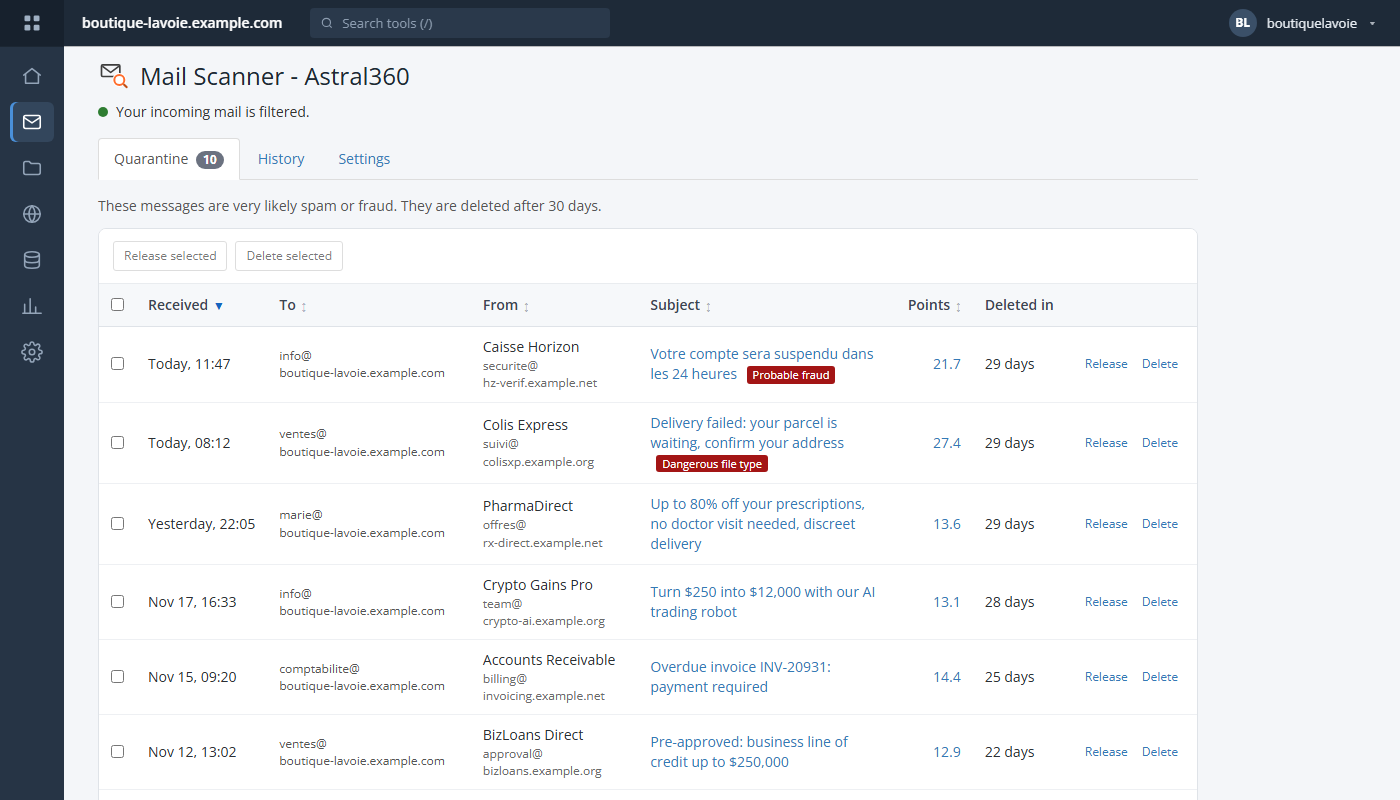
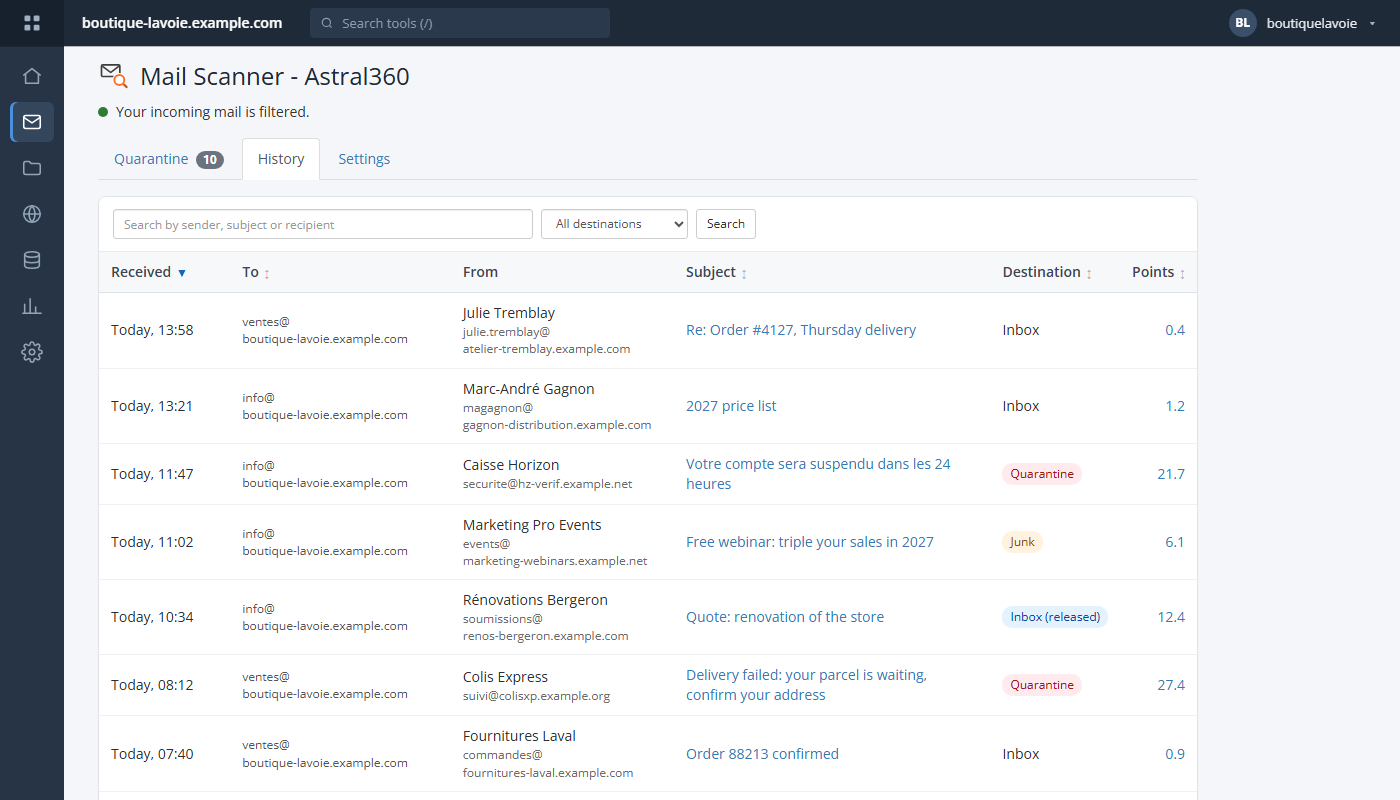
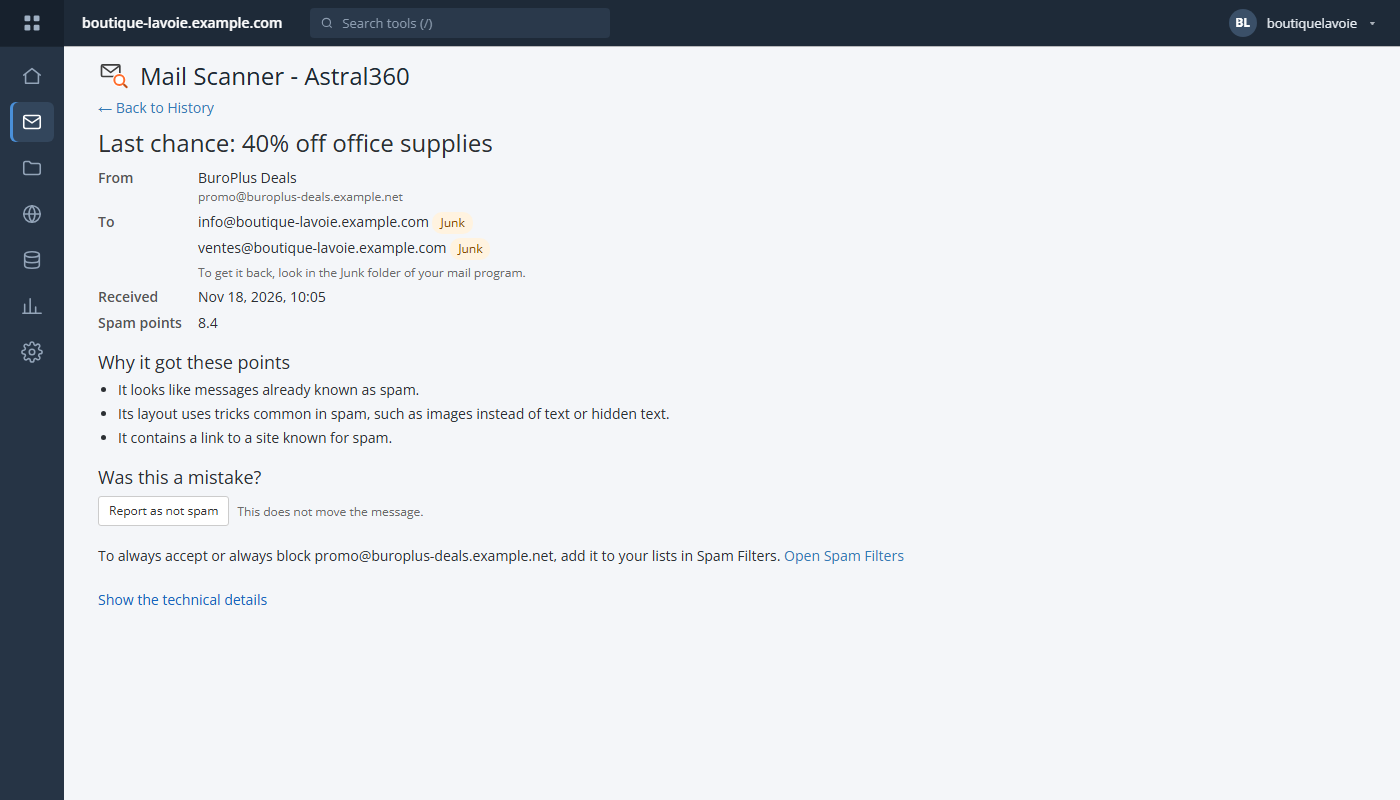
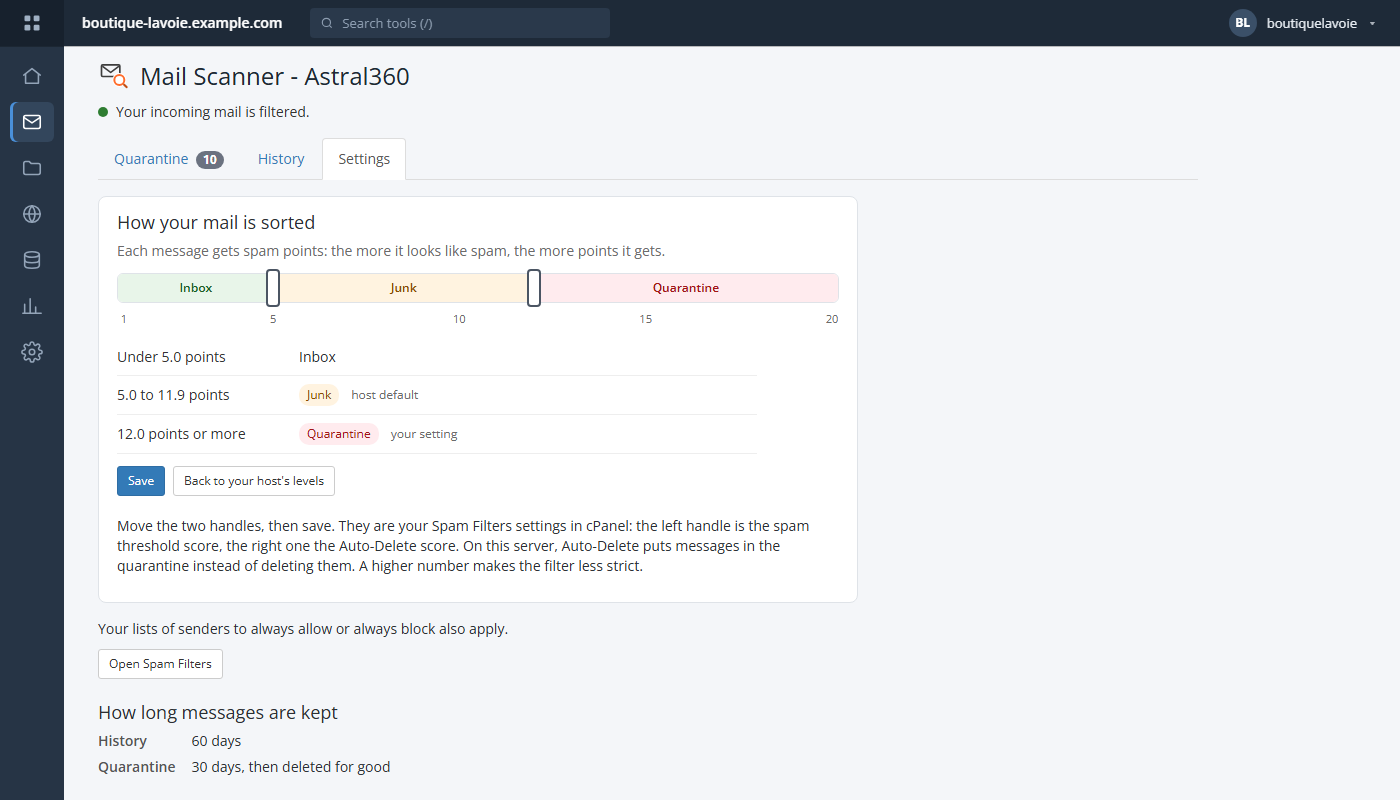
A Mail Scanner - Astral360 tile appears in the Email section of every account's cPanel, in English or French. The account owner sees every address of the account — no ticket, no admin in the loop.
Quarantine: release to the inbox or delete, one at a time or in bulk — a message that looks like fraud or carries a dangerous file type is flagged in red
History: where each copy went, searchable by sender, subject or recipient, with the reasons for its score in plain words
Report as spam / not spam — released messages teach SpamAssassin (20 a day per account at most)
Settings: two handles over Inbox, Junk and Quarantine bands, from 1 to 20 points, saved as cPanel's own Spam Filters settings
Turn the page off per hosting plan in WHM's Feature Manager
cPanel · Mail Scanner - Astral360 · QuarantinecPanel · Mail Scanner - Astral360 · HistorycPanel · Mail Scanner - Astral360 · a message and the reasons for its pointscPanel · Mail Scanner - Astral360 · Settings (the customer's own levels)
Set up for you, run from WHM
Installing Mail Scanner sets the server up in a console that shows each step as it runs: SpamAssassin and its add-ons tuned, the scanner connected, the customer page installed. In WHM, three tabs then keep you in charge.
Installs and tunes SpamAssassin's add-ons — Pyzor, Razor, DCC, Bayes learning, URI block lists — with the recommended settings in one pass
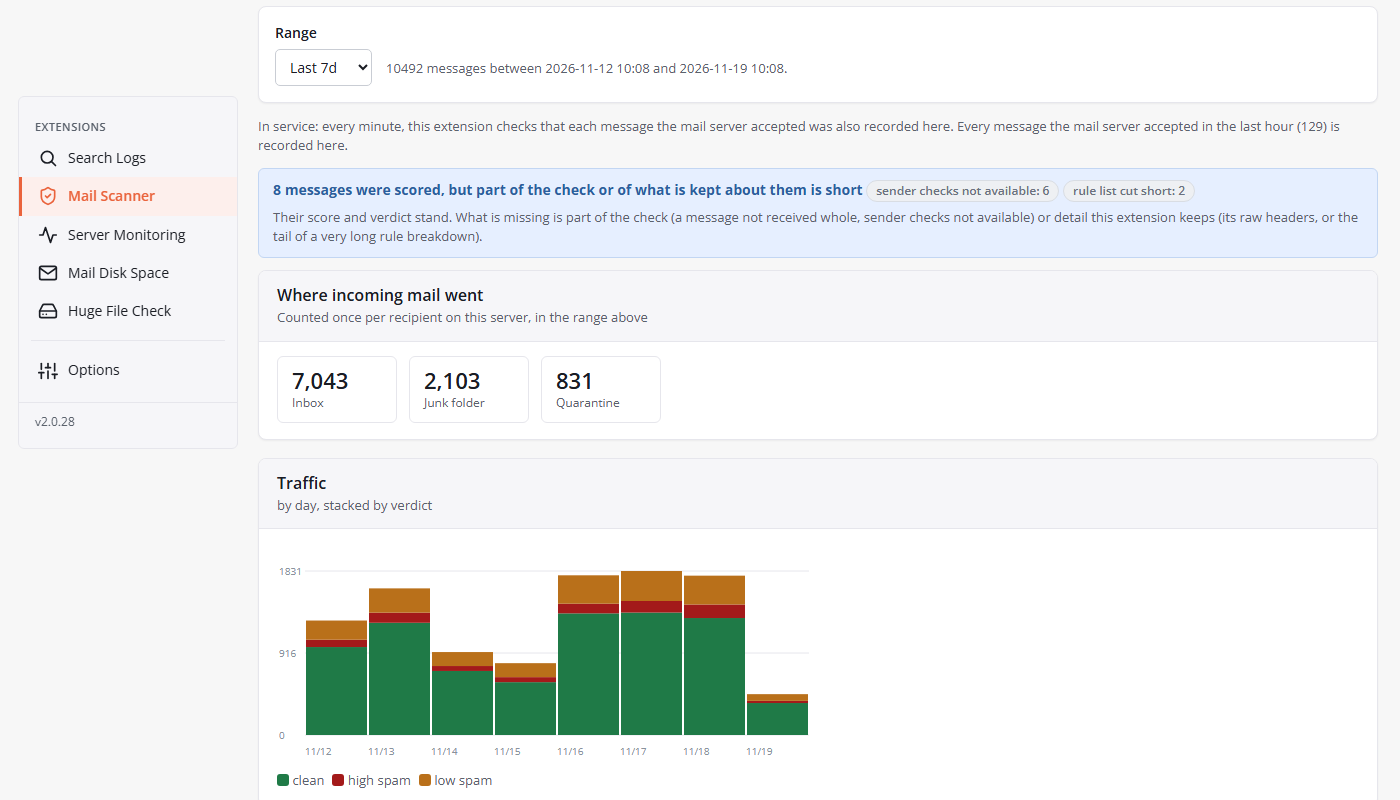
Dashboard: where incoming mail went (Inbox, Junk, Quarantine) and the traffic by hour or day
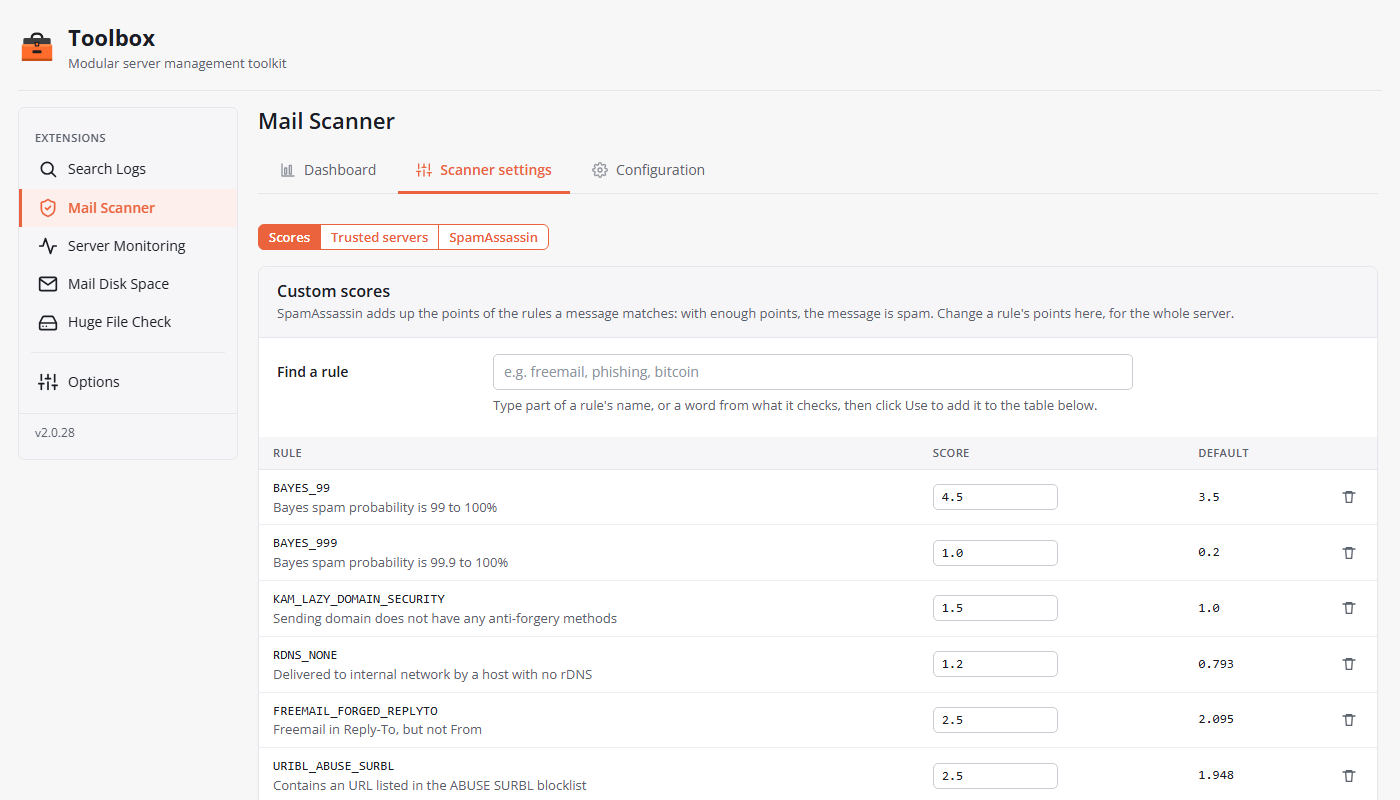
Scanner settings: change any rule's score — SpamAssassin checks it before it's saved — and list the gateways in front of your server
Spam learning shared by every account, in the server's MariaDB/MySQL or on a Redis server — or per account
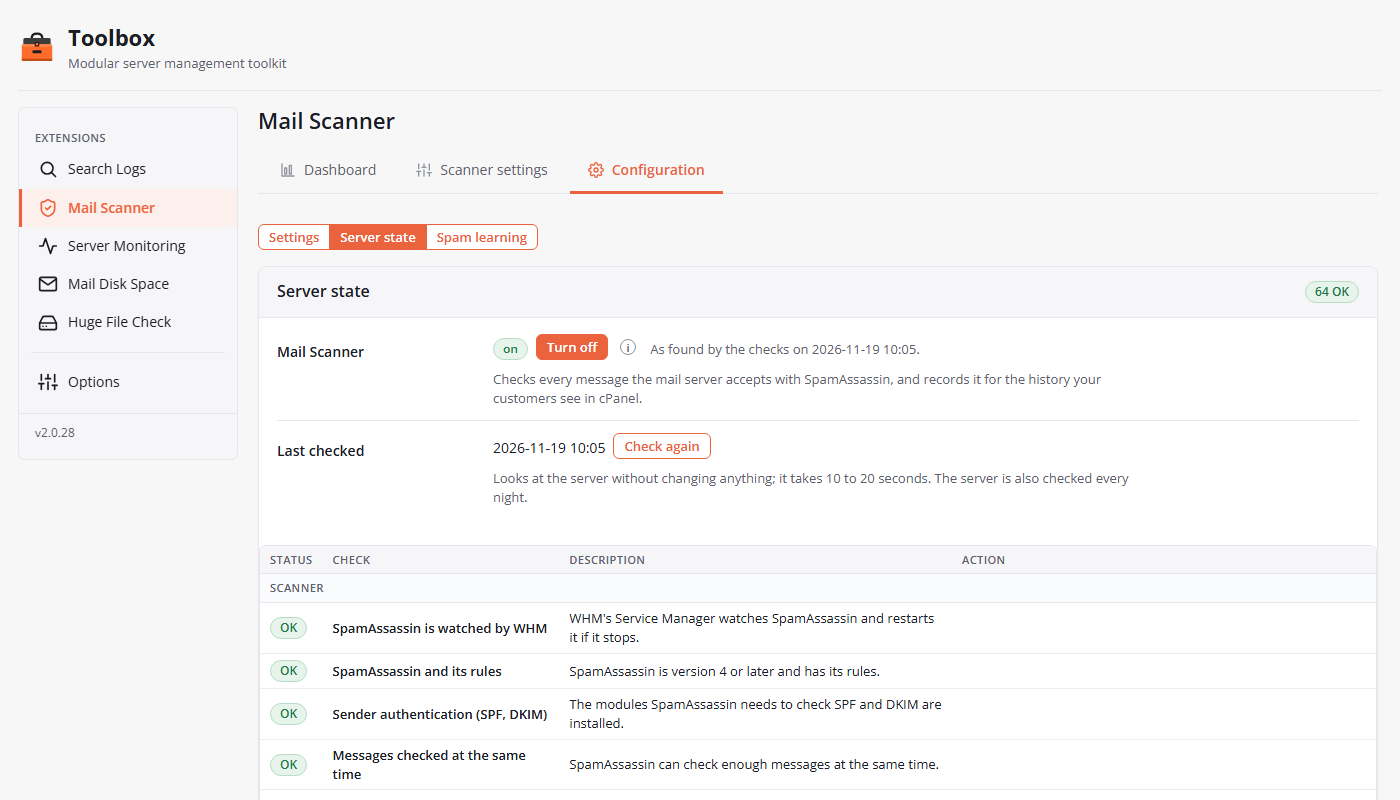
One On/Off, a Server state table of every check, and a Repair button when something drifts
WHM · Mail Scanner · Dashboard, last 7 daysWHM · Mail Scanner · Scanner settings, rule scoresWHM · Mail Scanner · Configuration › Server state
Get started in three steps
Install Astral Toolbox on the server — one line, as root.
In WHM, open Astral Toolbox › Options › Extensions.
Next to Mail Scanner, press Start trial: the install console sets the server up and shows each step as it runs.
Yes — that is why it exists. At install it finds the previous filter, takes it out of the mail path, removes its service, its cPanel page and hooks, and moves its files aside under /var/lib/toolbox-mail/legacy-backup instead of deleting them. Configuration › Server state then confirms that nothing of it is left.
No. The Spam Box is turned on for every account, the quarantine is always on, and the Mail Scanner - Astral360 page appears in their cPanel. They can tune their own levels, release or delete messages — or leave everything at your server's defaults.
Mail keeps flowing. If the scanner service stops answering, Exim delivers without it: a failure costs the record of a message, never the message. If a quarantine can't be written, the message goes to the Junk folder instead — never back to its sender.
The history records who sent a message, to whom, its subject, its points, the rules behind them and where each copy went — not its text. Quarantined messages are kept in each account's own home directory, written as the account, and the customer page shows text only: a held message's HTML and attachments are never opened.
Yes. Disabling it gives mail back to cPanel's own spam filtering within a minute or two. Remove does the same, then erases what it recorded — the index, its logs and the quarantined messages. Tick one box and the SpamAssassin, WHM and mail-server settings it changed go back to their values from before Mail Scanner.
A cPanel/WHM server with cPanel's Exim and SpamAssassin, PHP 7.4+ with pdo_sqlite, and Astral Toolbox with its task scheduler. It's $0.99/month per server (CAD), with a free trial to start.
Give your customers their quarantine back
Install Astral Toolbox, then start the Mail Scanner trial — the console sets the server up for you.